登录
空间
按回车键(Enter)搜索
帮助
在线帮助
快捷键
RSS源建立器
新功能
关于Confluence
水印插件 - 用户手册
登录
龙智产品 - 中文用户手册
编辑空间详情
空间快捷链接
龙智官网
龙智 Atlassian Marketplace 产品列表
有疑问?点击此处立马联系我们!
一般性KB
页面树结构
浏览页面
设置
空间管理
t
附件(10)
页面历史记录
页面信息
已解决评论
以层级方式查看
查看页面源代码
导出为水印PDF
导出为PDF
导出为Word
页面
…
龙智产品 - 中文用户手册
Confluence 水印 App(Watermark for Confluence)
3 常见问题
JIRA 链接
3.2 如何做到只在特定的页面显示水印,其他页面都不显示水印?
创建者:
李毅
,上次更新者:
国兴
,更新时间:
7月 08, 2024
需要 1 分钟阅读时间
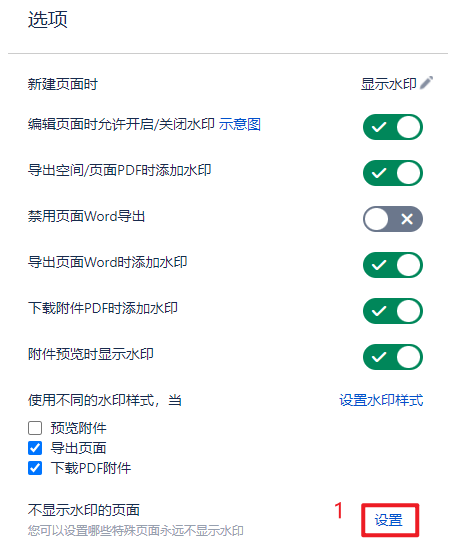
请参考以下操作步骤:
点击“设置”
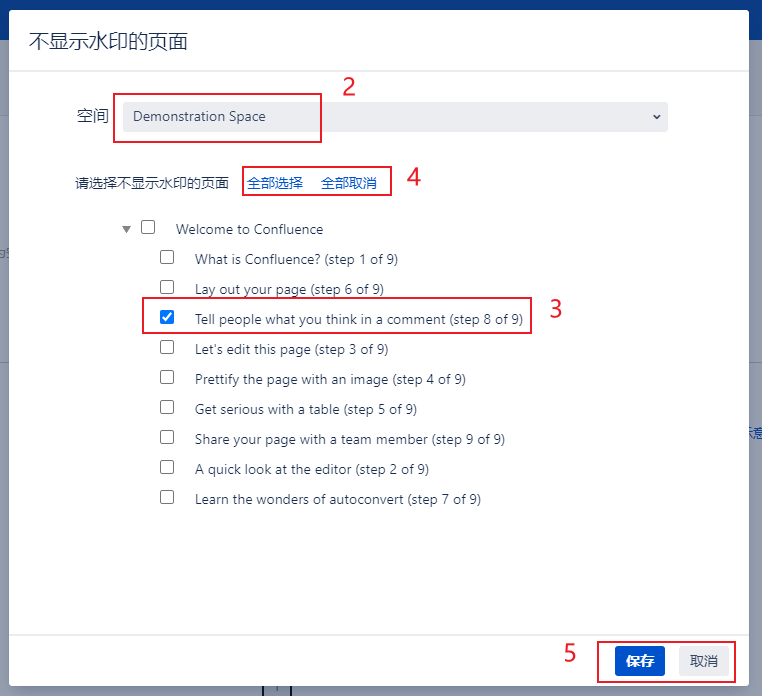
在弹出的页面中选择不需要显示水印的空间
勾选不需要显示水印的页面
“全部选择/取消”功能可以快捷的批量选择页面
点击保存/取消,使以上操作生效/不生效
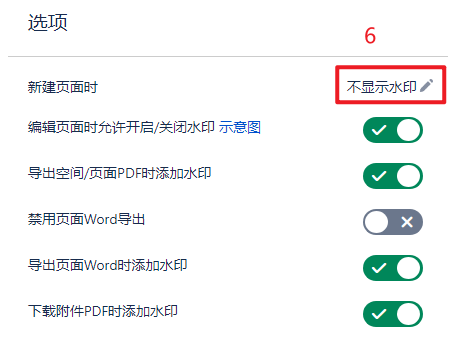
设置新建页面默认不显示水印,保证后续创建的页面也不显示水印
无标签
概览
内容工具
{"serverDuration": 80, "requestCorrelationId": "d343f9fbe3cff79d"}